Background for Harvester Install Guide: why the rebuild is shaped the way it is, what the hardware actually looks like, the traps that cost time, and what to do once it’s running. The guide is the ordered runbook and links back here at each step — nothing in this document needs to be read in order.
Why the rebuild
Longhorn’s write performance is the driver. It stays installed (Harvester’s system components expect it) but stops being the storage backend for VMs. Everything is powered off and all VM data is disposable, so this is a clean install of the latest Harvester rather than an in-place migration.
End state: 3-node Harvester v1.8.x cluster, all three nodes management/etcd (one is the “lambda” consumer-hardware GPU box), with Rook-Ceph running hyperconverged inside the cluster on dedicated disks per node. A single replica-3 RBD pool backs a ceph-block StorageClass that becomes the Harvester default — VM images, root disks and data disks all land on Ceph. Ceph replication rides the nodes’ admin subnet, a 10 GbE aggregation switch, configured by the installer with no post-install host networking. Rancher is redeployed via the rancher-vcluster experimental addon, then the Pulumi stacks are re-applied against the new cluster.
Decisions
Question
Answer
Ceph placement
Hyperconverged — Rook inside the Harvester cluster
Cluster shape
3 nodes, all management, one is the lambda/GPU box
Install method
Interactive ISO on each node
Pool
Single RBD pool, replica 3 / min_size 2, failure domain = host
Disks
OS/install disk + ≥1 dedicated raw disk per node for OSDs
Backups
No Harvester-native VM backup; rebuild from IaC + RBD snapshots
Ceph network
The node admin subnet — a 10 GbE agg switch — set at install. A separate mgmt NIC gets added later
Rancher
rancher-vcluster experimental addon, same as today
GPU passthrough
Lambda box only
Replica 3 vs 2
Size 3 errs on the side of safety. With min_size 2 a single host down leaves PGs degraded but still readable and writable, and a second failure stops IO rather than risking data loss — the safe failure mode, which matters with the lambda box being consumer hardware.
The price is one more replica write per IO, and usable capacity equal to the smallest host — ~5.25 TiB here, notraw/3 — with a self-healing threshold well below that because the disks are mixed sizes. See the capacity ceiling before planning around this. If capacity gets tight later, a second size-2 pool for bulk/cold data is a values change with no rebuild.
Constraints worth knowing before you start
v1.8 requires UEFI. Legacy BIOS boot was removed in 1.7.0. Check every box, especially the older R730XD. If dmidecode reports UEFI support but the box shows “Legacy BIOS”, it’s a firmware setting, not a hardware limit — switch to UEFI-only and disable CSM. Booting the v1.8 ISO successfully is itself the final proof.
VM images on Ceph work in v1.8. The 2023 KB (“external storage is for non-system data disks only”) is out of date — CDI integration means VM image / root disk / live migration / VM snapshot are all ✔ for rook-ceph.rbd.csi.ceph.com in the v1.8 support matrix.
VM Backup is ✗ on Rook RBD — Longhorn-only, no exceptions. Harvester’s Backup/Restore buttons will not work for Ceph-backed VMs; don’t build a recovery plan that assumes them.
Rook needs OS-level prep that survives reboots./var/lib/rook and /var/lib/ceph must be in PERSISTENT_STATE_PATHS, and rbd/nbd must load. See OS prep.
Rook-in-Harvester is not an officially documented Harvester path. Only external Ceph has a KB. It works, but you own the interaction between Harvester upgrades and Ceph (see Day 2).
Ceph is very sensitive to clock skew — NTP must work on all three nodes from first boot.
Hyperconverged Ceph competes with VMs for RAM/CPU: budget ~4 GB RAM + 2 cores per OSD and ~2 GB per mon/mgr, and leave it out of the VM overcommit math.
MTU must match end to end. If using 9000, set it on the switch ports and answer 9000 at the installer’s MTU prompt. Mismatched MTU makes Ceph fail intermittently and confusingly.
Don’t set a VLAN ID at install — Unifi puts the admin ports on untagged/tagged ports already.
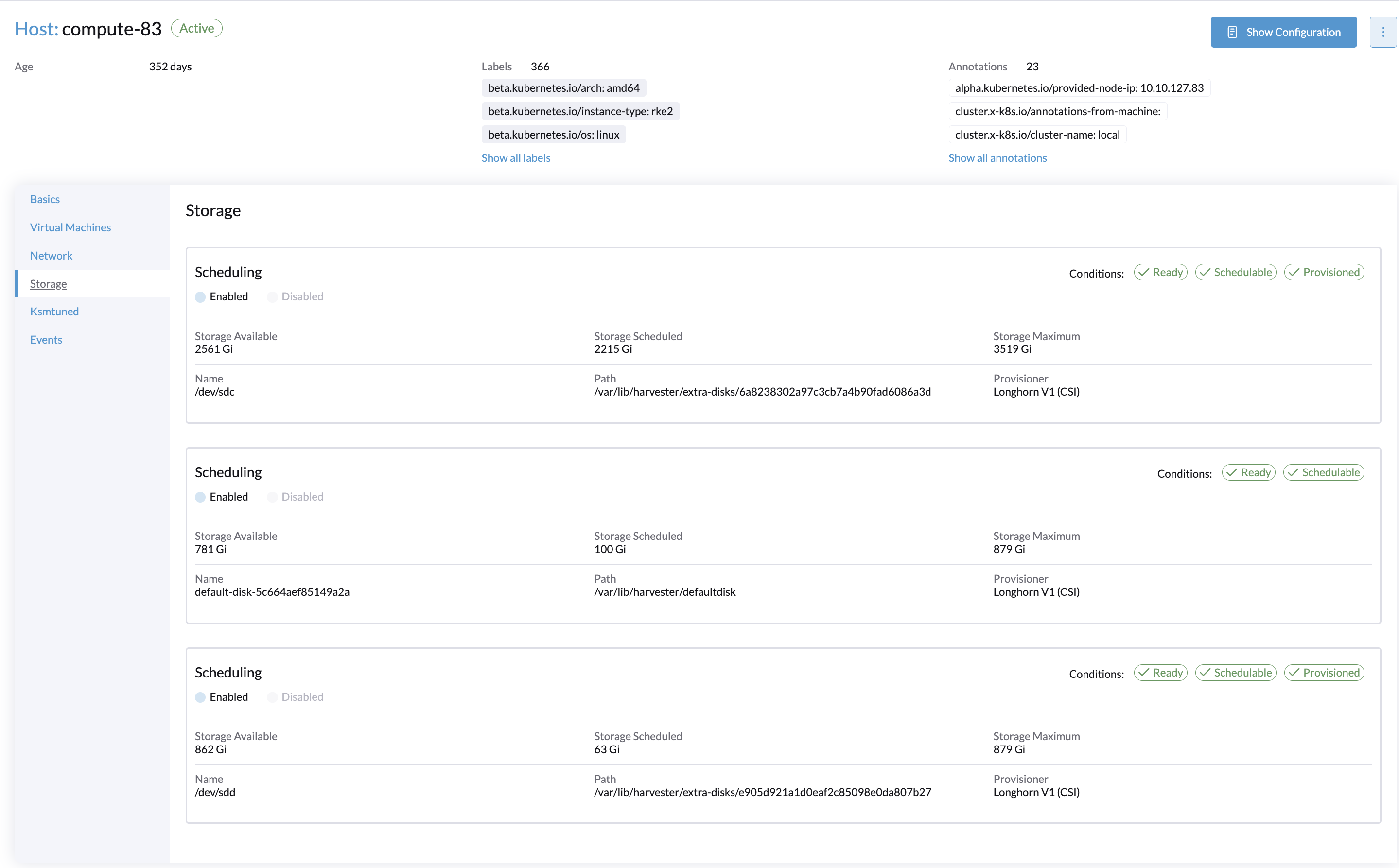
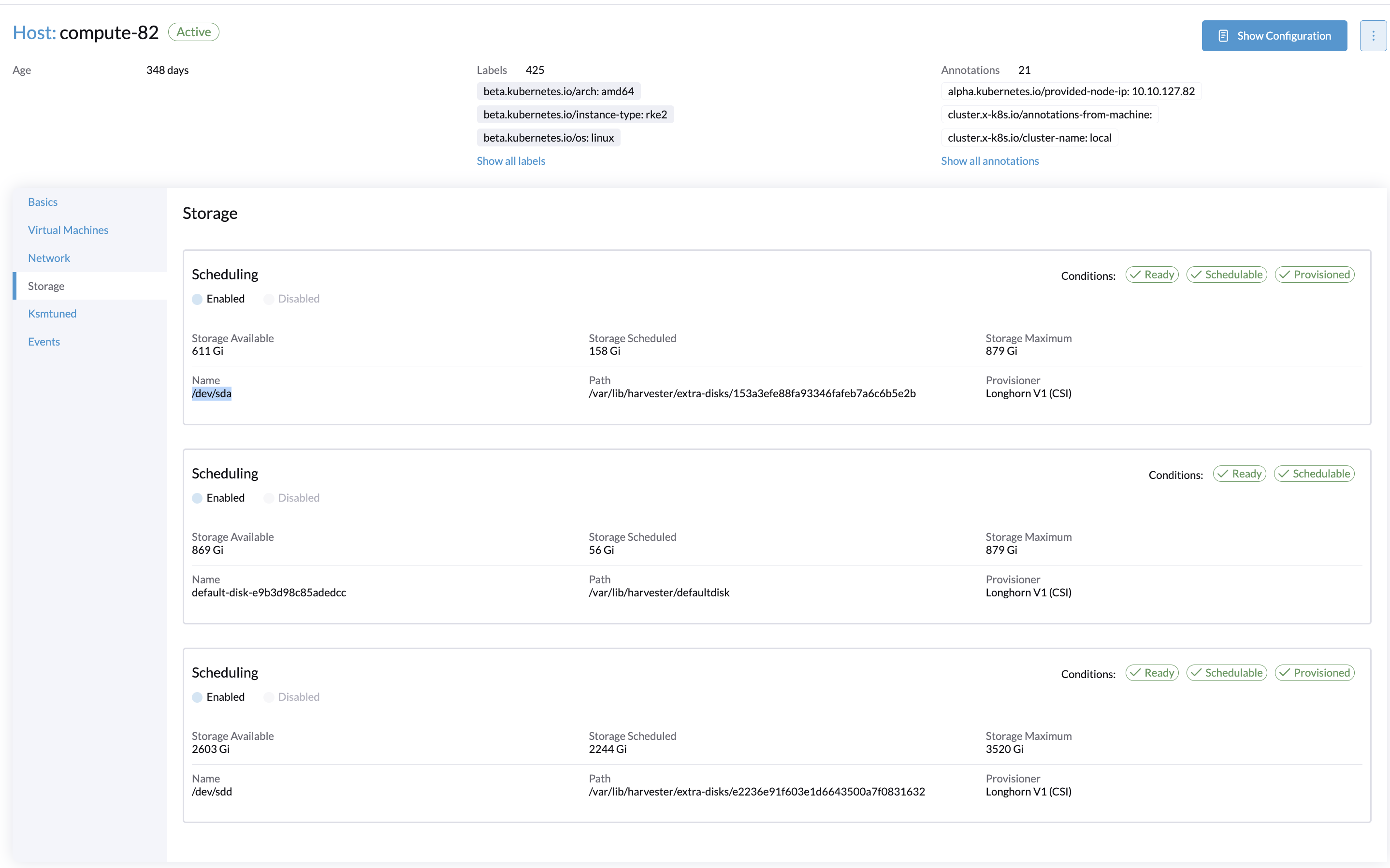
Pre-rebuild `lsblk`, showing which disks Longhorn held:

```text
compute-82:/ # lsblk
NAME   MAJ:MIN RM   SIZE RO TYPE MOUNTPOINTS
loop0    7:0    0     3G  1 loop /
sda      8:0    0 894.3G  0 disk /var/lib/harvester/extra-disks/153a3efe88fa93346fafeb7a6c6b5e2b
sdb      8:16   0 894.3G  0 disk /var/lib/harvester/defaultdisk
sdd      8:48   0   3.5T  0 disk /var/lib/harvester/extra-disks/e2236e91f603e1d6643500a7f0831632

compute-83:/ # lsblk
sdb      8:16   0 893.8G  0 disk /var/lib/harvester/defaultdisk
sdc      8:32   0   3.5T  0 disk /var/lib/harvester/extra-disks/6a8238302a97c3cb7a4b90fad6086a3d
sdd      8:48   0 893.8G  0 disk /var/lib/harvester/extra-disks/e905d921a1d0eaf2c85098e0da807b27
Telling real disks from Longhorn iSCSI volumes
In the by-id listing above, only the scsi-SDELL_PERC_H710_* / wwn-0x6141877* entries (sda–sdd) are physical disks behind the PERC controller. The scsi-1IET_* / SIET_VIRTUAL-DISK / scsi-360000000* entries (sde, sdj, sdk, sdm) are Longhorn volumes attached over iSCSI — they vanish with Longhorn and must never be wiped. Match on the SDELL_PERC serial, not on /dev/sdX.
PERC H710 configuration
Ceph wants plain disks. If the H710 is presenting them as single-disk RAID0 virtual disks (it has no true HBA/JBOD mode in most firmware), that’s supported — Harvester allows local disks and hardware RAID — but keep the controller cache consistent across all three OSD disks and don’t leave write-back enabled without a healthy BBU.
Cache policy matters for the whole pool. Ceph acks a write only once all three replicas commit, so the slowest host paces every IO in the cluster. If the H710 is in write-through (the correct setting without a healthy BBU) while the other two nodes’ SSDs handle fsync natively, compute-83 becomes the bottleneck for the entire pool. Since this rebuild exists specifically to fix write performance, benchmark a volume pinned to compute-83 before declaring it a win.
Why the disks get wiped from the rescue shell
Leftover Longhorn/Ceph/LVM signatures are the #1 cause of “OSD never gets created”. The wipe has to happen when nothing has the disk mounted:
Recommended — from the installer’s rescue shell or a live USB, immediately before installing node 1. The cluster is already powered off, nothing is mounted, and you’re at the console anyway. Clean disks also keep the installer’s disk picker unambiguous: an old HARV_LH_DEFAULT-labelled data partition sitting on a disk you aren’t selecting is exactly the kind of thing that gets auto-adopted and quietly handed back to Longhorn.
Or after the reinstall, before deploying Rook — from the new node’s shell, once you’ve confirmed in Hosts → <node> → Storage that the disk is unprovisioned. Works fine; just verify Harvester didn’t re-adopt it first.
Wiping on the running pre-rebuild cluster does not work: the disks are mounted and in use by Longhorn, so wipefs/sgdisk either refuse or leave the kernel holding a stale partition table while Longhorn logs errors. Removing the disk in the UI first (Hosts → <node> → Storage → remove the disk) makes it possible, but given the whole cluster is being reinstalled that’s effort for no gain.
OS prep: why a CloudInit CRD and not a file in /oem
Harvester’s OS is immutable; without persistent-path prep, Rook loses its mon/OSD metadata on every reboot. Normally this is set at install via os.persistent_state_paths; with an interactive install it has to be applied afterwards.
/oemis read on every boot — it’s the COS_OEM partition, and elemental/yip scans /system/oem, /oem and /usr/local/cloud-config alphabetically at each stage of each boot. That’s how the installer-written /oem/90_custom.yaml still applies. So dropping a file in /oem is a valid post-install method; it’s the contents that have to be right.
/oem/*.yaml must be a yip document, not a Kubernetes manifest
yip unmarshals each /oem/*.yaml into a config with name: and stages: at the top level. A CloudInit CRD manifest (apiVersion:/kind:/spec:) has no top-level stages:, so yip parses it, finds nothing, and silently no-ops — no error, no log, no bind mount. The stages: block inside spec.contents is an opaque string for the CloudInit controller; yip never unwraps it. Symptom: findmnt /var/lib/rook and lsmod | grep rbd both come back empty after a reboot.
The CloudInit CRD is preferred because it covers all nodes at once and survives node re-provisioning — the controller renders spec.contents, and only that, into /oem/99_rook.yaml on every matched node.
Why these stages, and what needs a reboot
99_ sorts after 90_, so the document’s rootfs stage runs after the installer’s and its PERSISTENT_STATE_PATHS wins.
The rootfs stage runs in the initramfs, before switch_root, and is the only place the persistent-path layout can be set — so the paths require a reboot, there is no runtime equivalent.
initramfs (not boot) for the modules: that’s the stage Harvester’s own installer uses for os.modules, and the one the upstream multipathd CloudInit example uses. The explicit modprobe commands are what actually load them; /etc/modules-load.d/rook.conf is belt-and-braces for systemd-modules-load and is rewritten each boot (/etc is a tmpfs overlay).
The modules need no reboot to take effect now — sudo modprobe rbd nbd on each node gets you running immediately; the file is only so it survives the next one.
The whole persistent-path list must be repeated verbatim, because yip’s environment:overwrites the key in cos-layout.env — it does not append, and it does no ${VAR} expansion (values are Go templates over yip’s own sysdata, nothing more). The list is not identical on every cluster: /var/lib/harvester/defaultdisk appears only when the Longhorn data disk has no partition of its own.
Re-check 99_rook.yaml after every Harvester upgrade
Because the key is overwritten rather than appended, this file pins the persistent-path list to whatever v1.8 shipped. If a later Harvester adds a new default path, this file silently reverts it. After each upgrade, diff /oem/90_custom.yaml’s list against the one baked in here.
Why IOMMU goes in grubenv, not a CloudInit
A yip stage would run grub2-editenvduring a boot, so the arg wouldn’t take effect until the boot after that — two reboots. Harvester keeps extra kernel args in /oem/grubenv as third_party_kernel_args; that’s on the OEM partition and Harvester’s own upgrade scripts read/modify it, so it survives upgrades. Editing grub.cfg on COS_STATE does not. A fresh v1.8 install already has multipath=off there, so the edit must append rather than overwrite.
When /var/lib/rook is not a bind mount
The PERSISTENT_STATE_PATHS string didn’t take. Fix it before deploying Rook, not after. Work backwards through the chain:
sudo head -3 /oem/99_rook.yaml # 1. starts with "stages:", not "apiVersion:"sudo grep PERSISTENT_STATE_PATHS /run/cos/cos-layout.env # 2. the merged value the initramfs usedsudo journalctl -b | grep -i 'yip\|cos-setup' # 3. parse errors / stage execution
A 99_rook.yaml that parses but produces no stages: is the silent failure mode above — step 2 shows the installer’s original list with no /var/lib/rook on the end.
PERC H710 reports its SSDs as rotational
Affects compute-83 only. Its OSD disks are SSDs, but they sit behind the PERC H710 as single-disk RAID0 virtual disks and the controller reports every VD as rotational. Two things read that flag, and only one of them is the CRUSH device class:
CRUSH uses it to pick the default device class, so Ceph auto-classes them hdd while compute-82 and inference-84 (plain ATA) come up ssd. With deviceClass: ssd pinned on the pool, that silently drops compute-83 and the failure domain quietly becomes 2 hosts — which size: 3 cannot satisfy, so the pool never goes clean. ceph osd crush set-device-class ssd fixes this half.
BlueStore reads /sys/block/<dev>/queue/rotational directly when it mounts the device and derives its tunings from it, ignoring the CRUSH class entirely. bluestore_prefer_deferred_size resolves to the _hdd value (65536) instead of the _ssd value (0), so every write ≤ 64 KiB is deferred into the RocksDB WAL and then written a second time to its final location.
The second one is the expensive one, and relabelling the CRUSH class does not touch it. Measured on the first ceph-block kbench run: 1.87M deferred write ops across osd.2/osd.6/osd.7 versus ~350 across the other five OSDs, 2–8× the replica subop latency and 2.4–3.5× the kv_sync (fsync) latency. Because the pool is size: 3 / failureDomain: host on exactly three hosts, every write in the cluster commits on compute-83 — so this one node sets the write-latency floor for the whole pool, which is what the benchmarks show.
The fix is a udev rule delivered as a CloudInit, matching devices by WWID — not /dev/sdX, which already shifted between the pre-flight capture and the rebuild, and not by model, because the OS disk sits behind the same controller and must keep rotational=1 unless separately confirmed to be an SSD. The manifest is 99-ceph-osd-rotational.yaml; its WWIDs are compute-83’s as built.
Apply this before deploying Rook — or restart the OSDs afterwards
BlueStore reads the flag once, at mount. Changing it under a running OSD does nothing until that OSD restarts. If the OSDs already exist, roll them one at a time with ceph osd set noout set, and confirm bluestore_bdev_type flips to ssd on each.
Getting the order wrong is worse than doing nothing. osd_class_update_on_start defaults to true, so an OSD that restarts while rotational=1 re-detects hdd and overwrites a manual set-device-class ssd. That drops compute-83 out of the pool’s default~ssd rule and leaves a size: 3 pool with only two eligible hosts — PGs go undersized and cannot place a third replica. Until the flag is fixed, the ssd class is a manual patch that is one reboot away from being reverted; fixing the flag makes it self-healing instead.
If an OSD disk is ever replaced, update the udev manifest and the Rook ceph-values.yaml device list together — a stale WWID fails silently and slowly.
Rook Helm values: the two merge traps
Helm deep-merges maps but replaces lists wholesale. Both behaviours bite in the same values file, in opposite directions.
Maps deep-merge — resources:
Always set both requests and limits. Specifying only requests leaves the chart’s default limits in place underneath, and a request above that stale limit is an invalid ResourceRequirements the mgr won’t start with.
osd carries a memory limit as well as a request for a second reason: requests-only leaves the pods Burstable with osd_memory_target at its 4 GiB default and no kubelet backpressure, and three OSDs ballooning on a node that’s also running Guaranteed-QoS KubeVirt VMs takes the VMs down with it. Rook derives osd_memory_target from the limit, so this both caps the pod and tunes Ceph. The CPU requests match the hyperconverged budget in Constraints — VMs are Guaranteed and OSDs are not, so under-requesting CPU here loses the scheduler fight under load.
Lists replace — cephBlockPools: and the CSI secrets
Re-declare the CSI secret parameters, or nothing can provision
cephBlockPools is a list, so the parameters: map inside it overrides the chart’s copy rather than adding to it. The chart’s copy is where the csi.storage.k8s.io/*-secret-* references live (helm show values rook-release/rook-ceph-cluster --version v1.19.1). Override parameters without repeating them and the StorageClass comes out with no credentials at all: every PVC sits Pending and the provisioner logs
Verify after deploying, before anything depends on it:
kubectl get sc ceph-block -o jsonpath='{.parameters}' | tr ',' '\n' | grep secret# expect 8 lines; zero means you hit this
Fixing it after the fact requires deleting the StorageClass — parameters is immutable, so helm upgrade alone fails with updates to parameters are forbidden. Do it before any PVC binds:
kubectl get pvc -A -o custom-columns=NS:.metadata.namespace,N:.metadata.name,SC:.spec.storageClassName \ | grep ceph-block # must be empty (or only Pending claims you can recreate)kubectl delete sc ceph-blockhelm upgrade rook-ceph-cluster rook-release/rook-ceph-cluster \ -n rook-ceph --version v1.19.1 -f ceph-values.yaml
Recreating the SC drops anything kubectl annotate put on it — which is why the CDI annotation and isDefault: true are declared in the values rather than applied with kubectl. A UI-set default annotation is lost the same way.
imageFeatures
Don't add object-map / fast-diff to imageFeatures
Tempting, because RBD snapshots are the entire backup story and fast-diff is what makes rbd export-diff incremental instead of a full-image scan. But both features require exclusive-lock, which conflicts with the RWX Block access mode the CDI annotation sets up for live migration. Live migration wins; accept that snapshot diffs scan the whole image.
The storage subnet is immutable
network.provider and addressRanges cannot be changed later without disruption — the storage subnet has to be right at deploy time. If a future NIC split ever re-IPs storage onto a new subnet, treat it as a Ceph migration, not a cabling change.
Longhorn leftovers after reinstall
Wiping the old disks properly (a full wipefs -a, not just -a -t <label>) avoids this entire section, which is why the guide wants the wipe done from the installer’s rescue shell.
Duplicate HARV_LH_DEFAULT labels
If a stale label survives, clear it off the old data disk, on the node (tune2fs is ext2/3/4 only — use xfs_admin -L "" for XFS, or just wipefs -a the whole disk if you’re done with it):
sudo tune2fs -L "" /dev/sdb # the OLD data disk, not the install disksudo blkid | grep -i HARV_LH_DEFAULTsudo udevadm trigger && ls -l /dev/disk/by-label/HARV_LH_DEFAULT
Both checks want exactly one hit, and it must be the install disk’s Longhorn partition (sdc6 below). The by-label symlink is what Harvester resolves at boot, so while two devices carry the label the winner is whichever udev saw last — which is how the wrong disk got adopted in the first place.
diskUUID mismatch after the label moves
Clearing the label moves /var/lib/harvester/defaultdisk back onto the install disk’s partition — what you want, but Longhorn will not follow it on its own. Hosts → <node> → Storage goes red on Ready and Schedulable and reports 0 Gi for available/scheduled/maximum, even though lsblk shows the correct partition mounted with plenty of free space:
sdc 465.8G disk└─sdc6 242.6G part /var/lib/harvester/defaultdisk HARV_LH_DEFAULT
This is not a mount or hardware problem. Longhorn records the disk’s UUID in the node CR and refuses to use a path whose backing filesystem changed identity underneath it — the guard that stops it silently orphaning replicas. Confirm that’s what you’re looking at:
NODE=compute-82kubectl -n longhorn-system get nodes.longhorn.io $NODE -o yaml | grep -A3 DiskFilesystemChanged# message: '... is not ready: record diskUUID doesn't match the one on the disk'# recorded UUID (node CR) vs actual UUID (on the disk itself)kubectl -n longhorn-system get nodes.longhorn.io $NODE \ -o jsonpath='{range .status.diskStatus.*}{.diskName}{" recorded="}{.diskUUID}{"\n"}{end}'sudo cat /var/lib/harvester/defaultdisk/longhorn-disk.cfg
The fix is to remove the disk from the node spec and re-add it, which makes Longhorn adopt the UUID actually present on the new filesystem. Check there are no replicas on it first — this is safe on a fresh cluster and destructive on a populated one:
kubectl -n longhorn-system get volumes.longhorn.iokubectl -n longhorn-system get replicas.longhorn.io \ -o custom-columns='NAME:.metadata.name,NODE:.spec.nodeID,DISK:.spec.diskID'
Both empty, then — DISK is the disk key from the diskName output above:
NODE=compute-82DISK=default-disk-e9b3d98c85adedcc# the validating webhook rejects removal of an enabled disk, so disable it firstkubectl -n longhorn-system patch nodes.longhorn.io $NODE --type=json \ -p="[{\"op\":\"replace\",\"path\":\"/spec/disks/$DISK/allowScheduling\",\"value\":false}]"kubectl -n longhorn-system patch nodes.longhorn.io $NODE --type=json \ -p="[{\"op\":\"remove\",\"path\":\"/spec/disks/$DISK\"}]"# wait for status.diskStatus to drop the entry, then re-add the same pathkubectl -n longhorn-system get nodes.longhorn.io $NODE -o jsonpath='{.status.diskStatus}{"\n"}'kubectl -n longhorn-system patch nodes.longhorn.io $NODE --type=json \ -p="[{\"op\":\"add\",\"path\":\"/spec/disks/$DISK\",\"value\":{\"allowScheduling\":true,\"diskDriver\":\"\",\"diskType\":\"filesystem\",\"evictionRequested\":false,\"path\":\"/var/lib/harvester/defaultdisk\",\"storageReserved\":0,\"tags\":[]}}]"kubectl -n longhorn-system get nodes.longhorn.io # READY/SCHEDULABLE both True
Don't "fix" it by editing longhorn-disk.cfg
The tempting shortcut — rewriting the on-disk diskUUID to match the one recorded in the node CR — leaves the old disk still carrying that same UUID in its own longhorn-disk.cfg. Re-add that disk to Longhorn later and you have two disks claiming one UUID. Re-adding the disk in the node spec is the direction that keeps both identities distinct.
Benchmarks
kbench, 30G, full mode, pinned to compute-82 in both cases — same manifest, same node, only the StorageClass differs. Raw output in kbench.
Metric
Longhorn (2026-07-31)
ceph-block (2026-08-01)
Δ
Random read IOPS
31,720
54,786
+73%
Random write IOPS
21,607
14,606
−32%
Seq read KiB/s
792,138
1,265,673
+60%
Seq write KiB/s
398,523
339,585
−15%
Random read latency (ns)
501,867
554,355
+10%
Random write latency (ns)
478,138
1,901,855
4×
Reads improved as expected. The write regression is not inherent to Ceph — this run was taken before the compute-83 rotational fix, and the 4× write latency is the deferred-write path described in PERC H710 reports its SSDs as rotational. A re-run after the udev rule is applied is still outstanding, and is the number that decides whether the migration met its goal.
Because the pool is size: 3 on exactly three hosts, compute-83 paces every write regardless of which node the benchmark pod lands on — so also run the benchmark pinned to compute-83 to separate the H710 cache policy from Ceph itself.
The capacity ceiling
With failureDomain: host, size: 3 and exactly three hosts, every host holds one replica of every object. Usable capacity is therefore the smallest host, not raw/3:
Host
OSDs
Raw
compute-82
894G + 894G + 3.5T
~5.25 TiB
compute-83
894G + 894G + 3.5T
~5.25 TiB
inference-84
3.5T + 3.5T
~7.0 TiB
Raw total is ~17.5 TiB, so raw/3 suggests ~5.8 TiB usable. The real ceiling is ~5.25 TiB, and ~1.75 TiB on inference-84 is permanently stranded. Adding OSDs to inference-84 later buys nothing — only capacity on compute-82/83, or a fourth host, raises the ceiling.
The sharper limit is self-healing. If the 3.5 TiB OSD on compute-83 dies, that host has 1.75 TiB left but still has to hold a full replica of the pool, and there is no fourth host to spill onto. Above ~1.75 TiB logical the affected PGs sit undersized+degraded until the disk is physically replaced — not until backfill finishes.
Self-healing threshold ≈ 1.75 TiB logical (~33% of usable). Past that, a single large-OSD loss on compute-82 or compute-83 means degraded-until-hardware.
Alert at 30% raw, not 70%. The usual “70% full” rule is wrong for this shape.
The fix, if that’s too tight, is to even out the disks so each host has similar capacity in similar-sized units — the 3.5T-plus-two-894G mix is what creates the cliff. A fourth host removes it entirely.
All OSDs within a host reach the same percentage full (CRUSH weights by size), so per-OSD skew isn’t the concern here; cross-host asymmetry is.
Day 2 operations
Node maintenance / Harvester upgrades:ceph osd set noout before rebooting or upgrading a node; ceph osd unset noout once it’s back and HEALTH_OK. Harvester’s upgrade controller knows nothing about Rook — one node at a time, confirm Ceph health between nodes.
Don’t sit on a degraded cluster. At size 3 on three hosts, a node left down means no spare host to re-replicate onto — PGs stay undersized until it returns, and a second failure halts IO. Fix downed nodes promptly and consider raising osd_recovery_max_active / osd_max_backfills during recovery.
Snapshots are the backup story: schedule RBD snapshots for stateful volumes (a CronJob calling rbd snap create, or Ceph’s rbd_support snapshot scheduler), including data-rancher-vcluster-0. Harvester VM backup won’t cover any of it. With layering-only images these diffs are full-image scans, so size the schedule accordingly — nightly on a 200 GiB volume is fine, every 15 minutes is not.
Capacity:ceph df weekly and watch MAX AVAIL, which reports the real number. See the capacity ceiling.
Monitoring: expose the Ceph dashboard / Prometheus exporter into the existing Grafana stack.
Growing later: a second CephBlockPool + StorageClass (e.g. size 2 for bulk/cold data) is a values change, no rebuild. Same for adding OSDs to existing nodes.
Re-check the persistent-path CloudInit after every Harvester upgrade — see the warning in OS prep.
Rancher vcluster caveats
This Rancher depends on Harvester and Ceph being healthy. If Ceph is down the management plane goes with it, and recovery is via the Harvester UI/kubeconfig directly.
Anyone with admin on harvester-system can reach the vcluster, so it’s less isolated than a VM install.
Disabling the addon leaves the PVC behind (re-enabling restores state); delete it manually for a truly clean slate.
The UI addon form is broken — configure via kubectl only (harvester#9816, open and unfixed as of v1.8, labeled area/ui). Enabling from Edit Config dies on a perfectly valid hostname:
admission webhook "validator.harvesterhci.io" denied the request:invalid fqdn rancher.internal.galaxygridlabs.com provided for rancher-vcluster addon
The v1.8 manifest pins chart vcluster v0.30.0, whose values are nested (global.hostname, global.rancherVersion, global.bootstrapPassword) and whose embedded Rancher manifests template {{ .Values.global.hostname }}. The webhook (validateVClusterAddon) reads the flat hostname key only when spec.version == "v0.19.0", otherwise it validates global.hostname — but the dashboard form still writes the flat keys. So the form populates hostname, the webhook rejects an empty global.hostname, and the error message then echoes the flat value, printing back the hostname you typed. Tell-tale sign: the Rancher Version field renders empty even though the manifest ships global.rancherVersion: v2.14.0. Nothing is wrong with the FQDN; set the values under global: and apply with kubectl.
Certificates are self-signed by default — keep whatever fronting is in use today.
Since VM backup doesn’t cover Ceph volumes, put data-rancher-vcluster-0 on the RBD snapshot schedule.
privateCA: "true" needs a fourth secret — tls-ca — that the guide’s cert steps don’t mention. Symptom: the imported Harvester cluster shows Unavailable / “Cluster agent is not connected” in Virtualization Management even after tls-rancher-ingress (leaf cert) and tls-ca-additional (Rancher→Harvester trust) are both in place and additionalTrustedCAs: "true" is set. cattle-cluster-agent logs in the Harvester cluster show tls: failed to verify certificate: x509: certificate signed by unknown authority connecting to wss://.../v3/connect — the agent doesn’t trust whatever Rancher’s ingress is actually serving. Check curl -sk https://<rancher-host>/v3/settings/cacerts | jq -r .value | openssl x509 -noout -issuer: if the issuer is O=dynamiclistener-org, Rancher is still on its own self-signed cert, not the private one. Root cause is usually one of two things not applied to the addon’s embedded rancher HelmChart set: block (kubectl -n rancher-vcluster edit addon rancher-vcluster):
ingress.tls.source still rancher instead of secret (Rancher ignores tls-rancher-ingress entirely at this setting).
ingress.tls.source: secretandprivateCA: "true" are both set, but there’s no secret named exactly tls-ca (key cacerts.pem, value = the CA that signed tls-rancher-ingress) in the vcluster’s cattle-system namespace. Unlike tls-ca-additional, this one isn’t optional once privateCA is on — the rancher pod’s new ReplicaSet sits in ContainerCreating forever with a FailedMount event (secret "tls-ca-x-cattle-system-x-rancher-vcluster" not found) while the old pod keeps serving the stale self-signed cert, so the rollout looks stuck rather than failed.
Fix: same UI flow as tls-rancher-ingress/tls-ca-additional — Cluster Explorer (local) → Storage → Secrets → Create, namespace cattle-system, type Opaque, name tls-ca, one key cacerts.pem, value = the Vault root CA. Once it exists the stuck rancher pod mounts and comes up without touching the addon again.
Never hand-compute CATTLE_CA_CHECKSUM — sha256sum on the CA file gives the wrong answer. After the CA change lands, cattle-cluster-agent can fail a second, different way that looks like a trust problem but isn’t. Two pods coexist and each fails differently, which is the confusing part:
# new ReplicaSet — CrashLoopBackOff, never reaches the agent binary
ERROR: Configured cacerts checksum (0b5921ae…) does not match given --ca-checksum (8aee7648…)
# old ReplicaSet — still Running, still failing
level=error msg="Failed to connect to proxy. Empty dialer response" error="tls: failed to verify certificate: x509: certificate signed by unknown authority"
The old pod’s error is expected and self-resolving: run.sh writes the CA to /etc/kubernetes/ssl/certs/serverca once at bootstrap and never re-reads it, so a pod that started before the cert change can only ever fail. It can’t self-heal, and because the deployment ships maxUnavailable: 0 it stays up while the new ReplicaSet crashloops — so the cluster keeps reporting Unavailable / “Cluster agent is not connected” and the stale error is the one you notice first. Ignore it and debug the new pods.
Those two checksums are the same certificate, differing only by a trailing newline. run.sh computes its side as:
jq -r always terminates its output with a newline, and the .value served by Rancher ends at -----END CERTIFICATE----- with no newline — so the agent always hashes PEM + \n. Rancher’s own systemtemplate.CAChecksum() matches that by appending \n when it’s missing. Anything that hashes the raw PEM (sha256sum ca.pem, or kubectl get setting cacerts -o jsonpath='{.default}' | sha256sum) is off by one byte and the agent refuses to start. Get the value the agent actually expects by running its own pipeline:
Then kubectl -n cattle-system set env deploy/cattle-cluster-agent CATTLE_CA_CHECKSUM=<that> on the Harvester cluster. The new ReplicaSet goes Running, the stale pod is retired by the rollout, and the cluster turns Active.
Better still, don’t patch it by hand at all — the deployment is Rancher-owned (objectset.rio.cattle.io/id: cluster-registration) and Rancher regenerates it with the correct checksum on re-registration. Confirm which convention a given revision used before assuming the cert is wrong: kubectl -n cattle-system get rs -l app=cattle-cluster-agent -o custom-columns='NAME:.metadata.name,REV:.metadata.annotations.deployment\.kubernetes\.io/revision' and read the env off each. A revision whose pod ever reached Connected to proxy had a correct checksum, so it’s a reliable reference point.
Short answer: nothing here is broken. Two metrics sit at the edge of the expected range and both have an identifiable cause — neither is Ceph itself.
The three kbench columns are three different tests
Not obvious from the summary output, and it changes what each number means. From longhorn/kbench:
Test
bs
iodepth
numjobs
Outstanding IO
IOPS
4K
128
8
1024
Bandwidth
128K
16
4
64
Latency
4K
1
1
1
All share ioengine=libaio, direct=1, time_based=1, ramp_time=60s, runtime=60s.
So the latency row is a QD1 single-threaded measurement — a much harsher test than the IOPS row, and the one that’s directly comparable to published Ceph latency work. Don’t read the two rows as describing the same workload.
Per-metric verdict
Post-fix run, pinned to compute-82:
Metric
Measured
Comparable band
Verdict
Random read IOPS
55,555 (6.9k/OSD)
40–80k on 3-node all-flash
Normal — CPU-bound, ~10% of what 8 SATA SSDs can read
Seq read
1,224 MiB/s
—
At the wire limit — see below
Random write IOPS
16,329 (6.1k/OSD backend)
10k/OSD “acceptable”, 15–16k/OSD on 40G IB
Low-normal, ~60% of the acceptable bar
Seq write
446 MiB/s
200–500 MiB/s, 3-node 10GbE replica-3
Normal
Random read latency
0.57 ms
0.3–0.8 ms
Normal
Random write latency
2.04 ms
0.73 ms on tuned NVMe/100GbE; 1–2 ms quoted for SSD/NVMe replica-3
Top of band, explainable, has headroom
Sequential read is pegged at the NIC, not at Ceph
1,253,302 KiB/s = 1.283 GB/s. With size: 3 on exactly three hosts, roughly a third of primary PGs are local to the benchmark node, so about two thirds of the read crosses the wire:
1.283 GB/s × 2/3 = 855 MB/s = 6.84 Gbit/s payload+ TCP/Ethernet framing ≈ 7.0 Gbit/s on the wire
That is the ~7 Gbit/s effective ceiling the mgmt NIC has from its PCIe lane allocation, to within measurement error. Sequential read is a cable number, not a Ceph number. Tuning Ceph will not move it; fixing the lane allocation will. The same arithmetic puts sequential write at ~624 MB/s of egress, ~71% of the ceiling — approaching it, not at it.
Worth noting against the Longhorn baseline: Longhorn managed 774 MiB/s reading from a single replica engine. Ceph stripes across all 8 OSDs and immediately ran out of wire, so the headline +58% understates it.
The write-latency floor is not the deferred-write path
Between the two Ceph runs the rotational fix moved random write IOPS 14,606 → 16,329 (+12%), but write latency went 1.90 → 2.04 ms — it did not improve.
That is the useful signal. Killing the deferred-write path helped throughput exactly as expected (deferred writes double-write small IO through the RocksDB WAL), but the QD1 floor didn’t move, so what’s left is not BlueStore’s write path — it’s the synchronous commit round trip plus the fsync on compute-83, which paces every write in the pool regardless of where the benchmark pod lands.
For scale: 42on measured 0.73 ms for the same QD1 4K replica-3 write, on 100 GbE Mellanox, EPYC at 3 GHz+, C-states pinned, NVMe-class Samsung PM drives. Against that reference this cluster has SATA (~+50–100 µs/op), 10 GbE (four RTT traversals in the commit path, ~+150–250 µs vs 100 GbE), E5-v3/v4-era R730xd cores at stock power settings, and a RAID controller in the path. 2.04 ms is what that stack should produce.
The 4.3× gap against Longhorn’s 0.48 ms is also the normal shape of this comparison, not a regression — Longhorn commits through a local replica engine, Ceph commits synchronously across three hosts on every write. A 2–4× QD1 write penalty is the expected cost of that trade.
Levers, highest payoff first
BIOS System Profile → Performance, C-states off, all three nodes. 42on names C-state pinning and the performance governor as their single largest latency win. Free; plausibly 2.04 → ~1.5 ms.
PERC H710 physical-drive write cache. The H710 has no JBOD/IT mode, so the OSDs are single-drive RAID0 VDs, and it commonly ships with the drive’s write cache disabled. With PLP enterprise SSDs the right setting is controller cache Write-Through and drive cache enabled — if it’s currently off, that is a large share of the 2 ms.
Re-run pinned to compute-83 (step 7 of the guide). Separates the H710 from Ceph definitively.
Confirm the fix landed at the BlueStore level, not just CRUSH — bluestore_bdev_type = ssd on compute-83’s three OSDs, and bluestore_min_alloc_size_ssd = 4096. IOPS moved but latency didn’t, which is consistent with the flag taking, but worth verifying rather than assuming.
Test with multiple clients. One kbench pod, one RBD image, ext4 on top, understates a cluster badly. Three concurrent clients would show whether 16.3k is a cluster ceiling or a single-client one — likely substantially the latter.
Fix the PCIe lanes. Required to move seq read at all, and it becomes the binding constraint everywhere once real client load arrives.