Also see Harvester Install Context for extra detail and context.
Steps that cannot be reordered
- Disks get wiped before the ISO install (step 1.8), from the rescue shell.
- The OS prep reboot (step 3) happens before Rook is deployed —
/var/lib/rookmust be a bind mount first, and BlueStore reads the rotational flag once, at OSD mount.network.provider/addressRangesand StorageClassparametersare immutable after deploy. Getting them wrong means delete-and-recreate.
0. Facts to fill in before you start
| Node 1 | Node 2 | Node 3 (lambda) | |
|---|---|---|---|
| Hostname | compute-83 | compute-82 | inference-84 |
| Mgmt IP / CIDR | 10.10.127.83 | 10.10.127.82 | 10.10.127.84 |
| Mgmt NIC(s) → bond | eno1 | enp131s0f0 | enp69s0 |
| Install/OS disk (by-id) | |||
| Ceph disk(s) (by-id) |
Cluster-wide:
| VIP | 10.10.127.200 |
| Gateway | 10.10.127.1 |
| DNS | 10.10.127.1 |
| NTP | (default) |
| Storage subnet | 10.10.127.0/24 — the admin subnet, no separate VLAN |
| MTU | (defaul) |
| Cluster token | 1password > 5e Homelab > Join Code |
| Rancher hostname | rancher.internal.galaxygridlabs.com |
The mgmt IP is the storage IP — admin and Ceph traffic share the 10 GbE agg switch for now, so there’s no second address to plan.
1. Pre-flight
-
Network dependencies.
- DNS
- NTP
- https egress to github
- VLAN configuration - Each node exists on the
Harvester-adminVLAN since it’s already a tagged port it doesn’t need explicit tagging in harvester.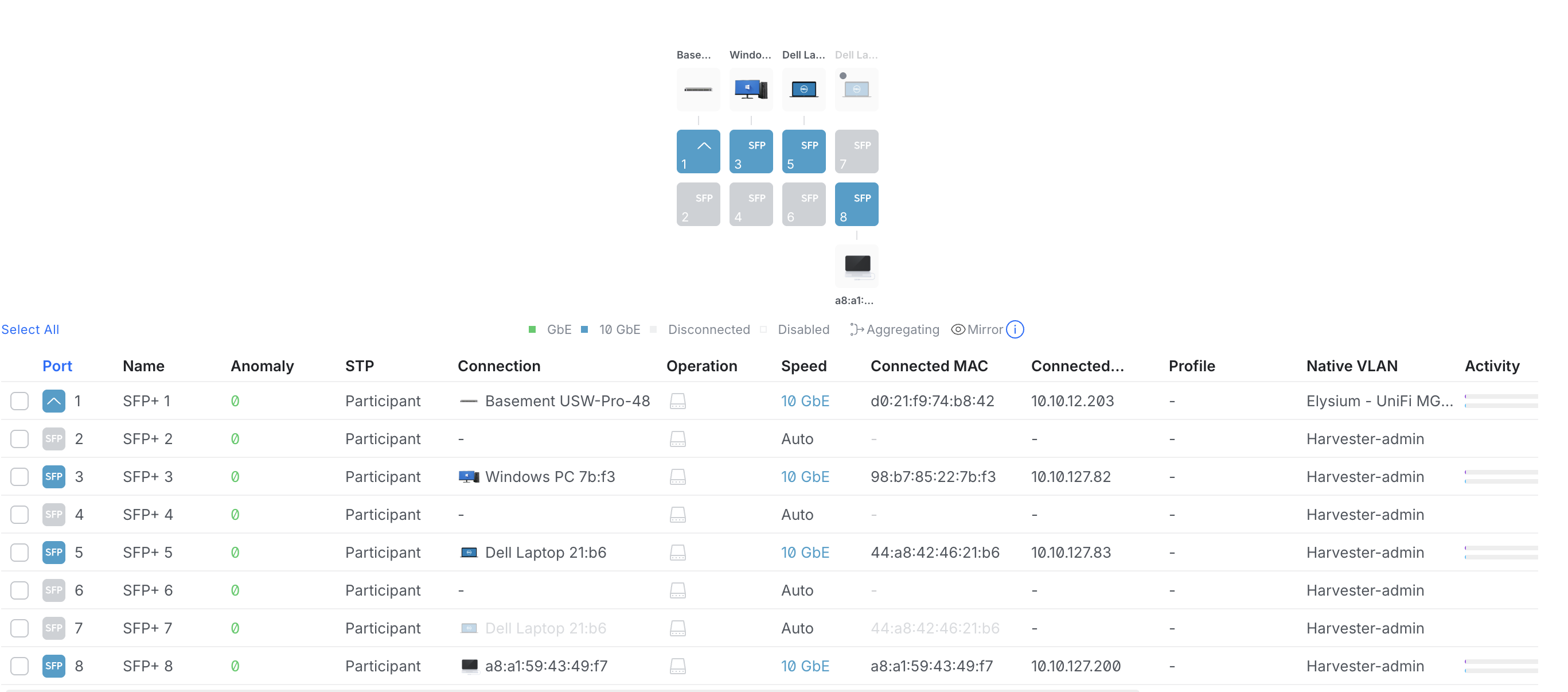
- VM network ports - each VM network needs its own dedicated NIC per node, on top of the mgmt/storage bond. Unifi tags those ports too, so harvester attaches them untagged (
vlan_id 0) on a cluster network of their own; the mgmt bond stays host-only (see step 4 below). Today that means oneharvester-public-netport on all three nodes and onemaldevport on the two compute nodes —inference-84has a single free wired NIC (enp71s0) andharvester-public-netgets it, so maldev VMs only schedule oncompute-82/compute-83. The pulumi side issrc/2_app/services/harvester/networks.py; fill its per-node uplink NIC names in after cabling.
-
Verify UEFI on every node. Run on the node as it stands today (
ssh rancher@<node>) or from any live boot:# Is this boot in UEFI mode? [ -d /sys/firmware/efi ] && echo "UEFI" || echo "Legacy BIOS/CSM" # Does the firmware support UEFI at all, regardless of how it booted? sudo dmidecode -t 0 | grep -iE "uefi|version|release date" # look for "UEFI is supported" # UEFI boot entries — only returns data when booted in UEFI mode sudo efibootmgr -v # EFI System Partition present on the install disk? lsblk -o NAME,SIZE,PARTTYPENAME,MOUNTPOINT | grep -i efiv1.8 dropped legacy BIOS boot entirely → Constraints worth knowing before you start.
-
Firmware settings. All three nodes: UEFI boot (no CSM), VT-x/AMD-V enabled. Lambda box only: also enable VT-d/AMD-Vi (IOMMU) — it’s the one node doing GPU passthrough, and enabling it now saves a reboot later. While in the PERC H710 firmware on
compute-83, check the cache policy → PERC H710 configuration. -
Switch config. Each node’s admin port lands on the 10 GbE agg switch — Unifi does the VLAN, nothing to set on the node.
-
Download the ISO. Current v1.8.x community release from https://github.com/harvester/harvester/releases (v1.8.0 GA’d 2026-04-28; v1.8.1 is Prime-only at time of writing — use the newest tag with a public
harvester-v1.8.x-amd64.iso). Verify the SHA512, write to USB. -
Record the disk
by-idpaths for every node while you still have a shell. These go into the Rook values —/dev/sdXnames are not stable across reboots.ls -l /dev/disk/by-id/ | grep -v partFill in the table in step 0. On the R730XDs, ignore the
scsi-1IET_*/SIET_VIRTUAL-DISK/scsi-360000000*entries — those are Longhorn iSCSI volumes, not disks → Telling real disks from Longhorn iSCSI volumes. -
Verify the backups already taken are readable from somewhere that isn’t Harvester, and finish the outstanding
Backup AI stack/Backup configsitems from Todos. After the next step the disks are gone. -
Wipe the intended Ceph disks from the installer’s rescue shell or a live USB, immediately before installing node 1. Leftover Longhorn/Ceph/LVM signatures are the #1 cause of “OSD never gets created” — and a leftover
HARV_LH_DEFAULTlabel causes a much messier problem later (Longhorn leftovers after reinstall).
DISK=/dev/disk/by-id/scsi-SDELL_...      # the Ceph disk, NOT the OS disk — check twice
lsblk -o NAME,SIZE,TYPE,MOUNTPOINTS $(readlink -f $DISK)   # must show no mountpoints
sudo sgdisk --zap-all $DISK
sudo blkdiscard $DISK || sudo dd if=/dev/zero of=$DISK bs=1M count=200 oflag=direct,dsync
sudo wipefs -a $DISK
Repeat for every Ceph disk on every node. Why this window and not the running cluster → Why the disks get wiped from the rescue shell.
2. ISO install
2.1 Node 1 — create the cluster
Boot the USB in UEFI mode → Install Harvester.
| Prompt | Answer |
|---|---|
| Installation mode | Create a new Harvester cluster |
| Node role | Management |
| Install disk | the OS disk |
| Data disk | leave as the install disk (Longhorn’s data disk — Ceph does not go here) |
| Persistent partition size | ≥ 200 GiB (holds /var/lib/rook, so give it room) |
| Hostname | compute-82,compute-83, inference-84 |
| Management NIC(s) / bond | the mgmt NIC(s); default bond mode active-backup |
| VLAN ID | leave unset — Unifi puts these on tagged ports already |
| Mgmt IP | 10.10.127.xx |
| MTU | 1500 unless the mgmt network is jumbo too |
| DNS | 10.10.127.1 |
| VIP mode | 10.10.127.200 |
| Cluster token | identical on all nodes, saved in Vault |
| Password | 1Password > 5e Homelab > Compute-XX |
| NTP | NTP server(s) — do not leave empty |
| Proxy | skip — direct internet access |
| SSH keys URL | optional, GitHub keys URL |
| Harvester config URL | skip |
The Ceph disks must not be selected as install or data disk
wipe_all_disksstays off. Review the summary screen and confirm no Ceph disk is listed anywhere.
Install → reboot → the node prints https://10.10.127.200. Log in, set the admin password.
2.2 Nodes 2 and 3 — join
Same answers, except:
- Installation mode → Join an existing Harvester cluster
- Management address →
https://10.10.127.200:443 - Cluster token → the identical token
- Node role → Management, Worker
2.3 Post-install checks
Hosts shows 3 nodes Active with the management/etcd role.
In Hosts → <node> → Storage, each Ceph disk appears as an unprovisioned disk — do not add it, that hands the disk to Longhorn.
sudo -i
kubectl get nodes -o wide
kubectl get pods -A | grep -v Running | grep -v Completed
lsblk                                  # Ceph disks present, no partitions
Download kubeconfig from the Web UI → Support → Download Kubeconfig
3. OS prep for Rook — one rolling reboot
Everything in this section is applied first, then the cluster is rebooted once, node by node. Harvester’s OS is immutable; without this Rook loses its mon/OSD metadata on every reboot → oem.
3.1 Read the current persistent path list from each node
It’s needed verbatim in the next step, and it is not identical on every cluster:
sudo grep -A5 PERSISTENT_STATE_PATHS /oem/90_custom.yaml3.2 Apply the Rook prereq CloudInit
Run from the workstation with the cluster kubeconfig, not on a node. Paste the full list from 3.1 into PERSISTENT_STATE_PATHS and append /var/lib/rook /var/lib/ceph — the key is overwritten, not appended to.
code src/2_app/harvester_setup/crds/rook.yaml # Make sure PERSISTENT_STATE_PATHS is correct
kubectl apply -f src/2_app/harvester_setup/crds/rook.yaml
Confirm the controller actually wrote it before rebooting anything — the per-node conditions are Applicable / Present / OutOfSync:
kubectl get cloudinit rook-prereqs -o yaml         # status.rolloutStatus, one entry per node
ssh rancher@<node> sudo head -3 /oem/99_rook.yaml  # must start with "stages:", NOT "apiVersion:"
3.3 Apply the compute-83 rotational udev rule
compute-83’s OSD SSDs sit behind a PERC H710 that reports them as rotational, which puts BlueStore on the HDD write path and sets the write-latency floor for the whole pool → PERC H710 reports its SSDs as rotational.
The manifest matches devices by WWID. Re-read them off the node before applying — the WWIDs in the file are compute-83’s as previously built:
for d in /sys/block/sd[a-z]; do
  printf "%-4s rot=%s %6sGB wwid=%s\n" "$(basename $d)" "$(cat $d/queue/rotational)" \
    "$(( $(cat $d/size) * 512 / 1000000000 ))" "$(cat $d/device/wwid)"
done
kubectl apply -f ./src/2_app/harvester_setup/cloudinit/99-ceph-osd-rotational.yaml
kubectl get cloudinit ceph-osd-rotational -o yaml # compute-83: Applicable=True, Present=TrueThis must land before the OSDs are created
BlueStore reads the flag once, at mount, and
osd_class_update_on_startwill revert a manualset-device-class ssdon the next restart. Doing it in the wrong order is worse than not doing it.
3.4 Add the IOMMU kernel arg — inference-84 only
ssh rancher@10.10.127.84. Idempotent; re-running won’t double-append. VT-d/AMD-Vi must already be on in firmware (step 1.3) or the arg is a no-op.
sudo -i

# A fresh v1.8 install already has multipath=off here — append, never overwrite.
CUR=$(grub2-editenv /oem/grubenv list | sed -n 's/^third_party_kernel_args=//p')
grep -q AuthenticAMD /proc/cpuinfo && IOMMU="amd_iommu=on iommu=pt" || IOMMU="intel_iommu=on iommu=pt"
case " $CUR " in *" iommu=pt "*) NEW="$CUR" ;; *) NEW=$(echo "$CUR $IOMMU" | xargs) ;; esac

grub2-editenv /oem/grubenv set third_party_kernel_args="$NEW"
grub2-editenv /oem/grubenv list      # confirm the old args are still there alongside the new ones
Why grubenv and not a CloudInit → Why IOMMU goes in grubenv, not a CloudInit.
3.5 Rolling reboot
Reboot one node at a time, waiting for Ready before the next.
3.6 Verify on every node
sudo findmnt /var/lib/rook          # must be a bind mount from /usr/local/.state/...
sudo findmnt /var/lib/ceph
lsmod | grep -E '^(rbd|nbd)'
sudo ls /var/lib/kubelet/plugins    # confirms Rook's default kubeletDirPath is correct
On compute-83, confirm the udev rule fired — the OSD disks must read 0, the OS disk must be untouched:
ls -l /etc/udev/rules.d/99-ceph-osd-rotational.rules
for d in /sys/block/sd[a-z]; do
  printf "%-4s rot=%s wwid=%s\n" "$(basename $d)" "$(cat $d/queue/rotational)" "$(cat $d/device/wwid)"
done
On inference-84, confirm IOMMU:
tr ' ' '\n' < /proc/cmdline | grep -i iommu
sudo dmesg | grep -iE 'DMAR: IOMMU enabled|AMD-Vi: .*enabled'
ls /sys/kernel/iommu_groups | wc -l   # must be > 0
If /var/lib/rook isn’t a bind mount, stop and fix it before deploying Rook → rook is not a bind mount.
4. Verify the storage network
Nothing to configure. The admin subnet the installer put on the mgmt bond is the storage network: those ports are on the 10 GbE aggregation switch, so Ceph’s host networking pins to 10.10.127.0/24 and the node’s mgmt IP is the address Ceph binds. No VLAN interface, no nmcli, no extra IP per node.
Still verify from each node, before deploying Rook:
ip -br a show                                    # mgmt bond holds the node's 10.10.127.x, MTU as intended
ping -c3 <other node mgmt IP>
Do not attach the storage-carrying interface to a Harvester cluster network / VM VLAN network — the mgmt bond stays host-only.
The second NIC comes later
A separate mgmt NIC gets added after the cluster is up, moving admin traffic off the agg switch and leaving 10 GbE to Ceph alone. That works without touching Rook only if the storage side keeps
10.10.127.0/24— see The storage subnet is immutable.
5. Deploy Rook-Ceph
Rook v1.19.x supports Kubernetes 1.30–1.35, which covers Harvester v1.8’s RKE2.
5.1 Confirm the OSD disks are clean
If step 1.8 was skipped or a disk was re-adopted, wipe it now — from the node’s shell, after confirming in Hosts → <node> → Storage that the disk is unprovisioned:
DISK=/dev/disk/by-id/scsi-SDELL_...      # the Ceph disk, NOT the OS disk — check twice
lsblk -o NAME,SIZE,TYPE,MOUNTPOINTS $(readlink -f $DISK)   # must show no mountpoints
sudo sgdisk --zap-all $DISK
sudo blkdiscard $DISK || sudo dd if=/dev/zero of=$DISK bs=1M count=200 oflag=direct,dsync
sudo wipefs -a $DISK
5.2 Namespace
PSA labels: v1.8 enforces Pod Security Admission on Harvester’s system namespaces only, so on a stock cluster these change nothing. Set them anyway — Rook’s mon/OSD pods are privileged, and the labels keep them admissible the moment anything applies a restrictive cluster-wide default.
kubectl create namespace rook-ceph5.3 Operator
helm repo add rook-release https://charts.rook.io/release && helm repo update
helm install rook-ceph rook-release/rook-ceph -n rook-ceph --version v1.19.1 \
  --set enableDiscoveryDaemon=true
kubectl -n rook-ceph rollout status deploy/rook-ceph-operator
5.4 ceph-values.yaml
Substitute the by-id device paths from step 0 and the storage subnet. Do not edit the parameters: or resources: blocks without reading Rook Helm values: the two merge traps — Helm deep-merges maps but replaces lists, and both behaviours have a failure mode here.
code ./src/2_app/harvester_setup/chart-values/ceph.yaml
5.5 Install the cluster chart
helm install rook-ceph-cluster rook-release/rook-ceph-cluster \
  -n rook-ceph --version v1.19.1 -f ./src/2_app/harvester_setup/chart-values/ceph.yaml
5.6 Verify — watch it converge, 5–15 min
kubectl -n rook-ceph get pods -w
kubectl -n rook-ceph exec -it deploy/rook-ceph-tools -- ceph -s        # HEALTH_OK, 8 osds up/in
kubectl -n rook-ceph exec -it deploy/rook-ceph-tools -- ceph osd tree  # 3 hosts, weights sane, CLASS all ssd
kubectl -n rook-ceph exec -it deploy/rook-ceph-tools -- ceph osd pool get harvester-pool size
kubectl -n rook-ceph exec -it deploy/rook-ceph-tools -- ceph osd pool get harvester-pool min_size
kubectl -n rook-ceph exec -it deploy/rook-ceph-tools -- ceph config get mon public_network
kubectl -n rook-ceph exec -it deploy/rook-ceph-tools -- ceph df        # MAX AVAIL ≈ smallest host

# the eight CSI secret parameters actually landed
kubectl get sc ceph-block -o jsonpath='{.parameters}' | tr ',' '\n' | grep secret   # expect 8 lines
Expect size: 3, min_size: 2, and CLASS ssd on all 8 OSDs — if compute-83’s three come up hdd, the udev rule in step 3.3 didn’t take; fix that rather than relabelling by hand (PERC H710 reports its SSDs as rotational).
If public_network is empty, addressRanges didn’t apply — set it explicitly with ceph config set global public_network 10.10.127.0/24 and restart the mons. If OSDs never appear, read kubectl -n rook-ceph logs job/rook-ceph-osd-prepare-<node> — almost always a leftover disk signature; redo step 5.1 on that disk.
5.7 Ceph dashboard
kubectl -n rook-ceph get service
# http://10.10.127.200:7000/#/dashboard   user: admin
kubectl -n rook-ceph get secret rook-ceph-dashboard-password -o jsonpath='{.data.password}' | base64 -d && echo
6. Wire Harvester to Ceph
- VolumeSnapshotClass — Harvester already ships the snapshot CRDs/controller:
kubectl apply -f ./src/2_app/harvester_setup/crds/ceph-rbd-snapclass.yaml-
Advanced → Settings → csi-driver-config → add an entry:
- Provisioner:
rook-ceph.rbd.csi.ceph.com - Volume Snapshot Class Name:
ceph-rbd-snapclass
- Provisioner:
-
Verify the CDI annotation — the chart sets it from step 5.4’s values, so this is a check, not a step. The
annotateis only for a cluster deployed before that was added:
kubectl get sc ceph-block -o jsonpath='{.metadata.annotations}' | tr ',' '\n' | grep cdi
kubectl annotate sc ceph-block \
cdi.harvesterhci.io/storageProfileVolumeModeAccessModes='{"Block":["ReadWriteMany"]}'-
Verify the default StorageClass — also set by
isDefault: true. Confirm under Advanced → StorageClasses thatceph-blockshows as Default. Leaveharvester-longhornin place (unused, but Harvester system components expect Longhorn to exist). -
Trim Longhorn’s CPU reservation — Longhorn stays installed but idle, and its three
instance-managerpods still hold a guaranteed 12% of each node’s allocatable CPU for zero volumes: 18.77 cores here, 37% of everything the cluster reserves. Drop it to 1%, enough for the occasionalvmstate-persistencevolume:
# confirm Longhorn really is idle first — both should be empty
kubectl -n longhorn-system get volumes.longhorn.io
kubectl -n longhorn-system get backingimages.longhorn.io

kubectl -n longhorn-system patch settings.longhorn.io guaranteed-instance-manager-cpu \
  --type=merge -p '{"value":"{\"v1\":\"1\",\"v2\":\"1\"}"}'

# Longhorn deletes and recreates the instance managers itself; requests should read 1% per node
kubectl -n longhorn-system get pods -l longhorn.io/component=instance-manager \
  -o custom-columns='NAME:.metadata.name,NODE:.spec.nodeName,CPU:.spec.containers[0].resources.requests.cpu'
Cluster CPU reserved drops from 32.21% to ~21.2%. The recreate is only safe while no engines or replicas are running, hence the check first. Revert with the same patch and "12".
This one drifts back on upgrade
guaranteed-instance-manager-cpuis not in Harvester’slonghorn-default-settingconfigmap, so nothing pins it day to day — but a Harvester or Longhorn upgrade can re-apply the 12% default. Re-check it after every upgrade. Set it back to12before putting real load on Longhorn.
7. Smoke tests and benchmark
In this order — each exercises a different code path:
- Upload a cloud image (e.g. Ubuntu 24.04) with StorageClass
ceph-block; it should reachActivewith a backing PVC. - Create a VM from it; confirm the root disk PVC is
ceph-blockand it boots. - Live migrate it to another node.
- Take a VM snapshot and restore it.
- Hot-plug a second
ceph-blockdata disk. - Confirm Backup is unavailable/fails — expected, documented Rook limitation.
- Pull one node’s power — do it now, while the cluster is empty. Ceph goes
HEALTH_WARN/degraded but VMs keep running and writing (min_size 2of 3 replicas). Bring it back and confirm it backfills toHEALTH_OK. With two hosts down, IO halts by design until one returns.
kbench on ceph-block — apples-to-apples against the pre-migration Longhorn baseline: same manifest, same node pin, same 30G full-mode run, only the StorageClass differs. Run from the repo root on the Harvester cluster kubeconfig:
# kbench reuses the same object names across all three manifests — clear any previous run first
kubectl -n kbench delete job kbench --ignore-not-found
kubectl -n kbench delete pvc kbench-pvc --ignore-not-found

kubectl create ns kbench
kubectl apply -f ./src/2_app/bench/kbench/kbench-ceph-block.yaml

kubectl -n kbench get pvc,pod
kubectl -n kbench logs -l kbench=fio -f --tail=-1 \
  | tee ./src/2_app/bench/kbench/results-ceph-block-$(date +%Y%m%d).txt

# Latest benchmark result
# =========================
# FIO Benchmark Summary
# For: ./test_device
# CPU Idleness Profiling: disabled
# Size: 30G
# Mode: full
# =========================
# IOPS (Read/Write)
#         Random:          55,555 / 16,329
# Bandwidth in KiB/sec (Read/Write)
#     Sequential:      1,253,302 / 456,928
# Latency in ns (Read/Write)
#         Random:      571,765 / 2,039,454

kubectl delete -f ./src/2_app/bench/kbench/kbench-ceph-block.yaml
kubectl delete ns kbench
Then benchmark inside a VM on ceph-block — kbench measures the CSI/RBD path, this adds the KubeVirt virtio layer on top:
fio --name=w --rw=randwrite --bs=4k --iodepth=32 --numjobs=4 --size=4G \
    --runtime=60 --time_based --direct=1 --group_reporting
Compare against the numbers in Benchmarks.
8. Rancher install
The rancher-vcluster experimental addon, which runs a nested K3s vcluster in the rancher-vcluster namespace and syncs its ingress out to Harvester.
Prereqs: Ceph healthy and ceph-block set as default first — the addon’s data-rancher-vcluster-0 PVC lands on whatever the default StorageClass is. DNS rancher.internal.galaxygridlabs.com → the Harvester VIP.
Configure this addon with
kubectl, not the UIDo not use Advanced → Add-ons → rancher-vcluster → Edit Config. The dashboard form writes the pre-v0.19 flat keys (
hostname,rancherVersion,bootstrapPassword) while the v1.8 chart and the validating webhook both expect them nested underglobal:— saving the form fails admission withinvalid fqdn <your hostname> provided for rancher-vcluster addon, and would render Rancher with an empty hostname even if it didn’t. Details → Rancher vcluster caveats. https://github.com/harvester/harvester/issues/9816#issuecomment-3722934863
Configure Harvester TLS
Install Rancher
- Fetch the addon definition (not shipped in the ISO) rather than applying it straight from the URL — it needs edits before it’s useful:
curl -o /tmp/rancher-vcluster.yaml -sSL https://raw.githubusercontent.com/harvester/experimental-addons/v1.8/rancher-vcluster/rancher-vcluster.yaml
code /tmp/rancher-vcluster.yaml- Edit the file: fill in the
global:block insidespec.valuesContent, and setspec.enabled: true.
| Key | Value |
|---|---|
| global.hostname | 10-10-127-200.sslip.io |
| global.bootstrapPassword | 1password > rancher |
| global.rancherVersion | a v2.14.x patch — required by Harvester v1.8 |
| spec.enabled | true |
The file now holds the bootstrap password — keep it out of git. Apply it:
kubectl apply -f /tmp/rancher-vcluster.yaml
rm /tmp/rancher-vcluster.yaml
Later config changes go through kubectl -n rancher-vcluster edit addon rancher-vcluster, never the UI form.
- Watch it come up and confirm the PVC bound to
ceph-block:
kubectl -n rancher-vcluster get pods,pvc
kubectl -n rancher-vcluster get pvc data-rancher-vcluster-0 -o jsonpath='{.spec.storageClassName}'-
Browse
https://rancher.internal.galaxygridlabs.com, log in with the bootstrap password, set the admin password. -
Enable the Harvester UI add-on.
-
Import Harvester into this Rancher: Rancher → Virtualization Management → Import Existing → copy the registration URL → Harvester Advanced → Settings → cluster-registration-url.
-
Mint the unscoped admin API token (see the README section “Rancher (smoll-harvester provisioning)”) and
pulumi config set --secret rancher2:tokenKey ...insrc/2_app. -
Images and VM networks are both pulumi-managed by
src/2_app—create_all_images()andcreate_all_networks()inservices/harvester/— so apulumi upre-creates them. Before that run, confirm the VM network ports are cabled and thatNETWORKSinservices/harvester/networks.pynames the right uplink NIC per node (step 1.1); a VlanConfig on a NIC with no carrier never goes ready, and a missingharvester-public-netNAD makes every smoll-harvester machine fail its pre-create check and loop create → delete forever. -
Replace Rancher’s self-signed cert with the one Vault already mints for
rancher.internal.galaxygridlabs.com(pki_setup.py’ssetup_unmanaged_certs→rancher_cert). It isn’t exported yet, so add that first:
# src/2_app/pki_setup.py, inside setup_unmanaged_certs
pulumi.export("rancher_cert", rancher_cert[0])
pulumi.export("rancher_privkey", rancher_cert[1])
pulumi up (adds stack outputs only, no resource churn), then pull the material out of state and grab the root CA over Vault’s own publicly-trusted TLS listener — same CA the README.md/Vault trust snippet uses:
cd src/2_app
pulumi stack output rancher_cert --show-secrets > /tmp/rancher-tls.crt
pulumi stack output rancher_privkey --show-secrets > /tmp/rancher-tls.key
curl -sSL https://vault.galaxygridlabs.com/v1/pki2/ca/pem -o /tmp/rancher-ca.pem- Rancher runs inside the vcluster’s own API server, not Harvester’s — connect to it (
vclusterCLI) before touching its secrets:
- In the Rancher UI, make sure you’re in the local cluster (that’s Rancher managing itself — which is the vcluster’s API server, not Harvester’s).
- Cluster Explorer → Storage → Secrets → Create, namespace cattle-system.
- Type TLS Certificate, name tls-rancher-ingress, upload /tmp/rancher-tls.crt as the certificate and /tmp/rancher-tls.key as the private key.
- Also required, easy to miss: Type Opaque, name
tls-ca(fixed name, don’t rename), one key exactlycacerts.pem, value = the Vault root CA (/tmp/rancher-ca.pem).privateCA: "true"(next step) expects this secret to exist; without it therancherpod’s new ReplicaSet sits inContainerCreatingforever (FailedMount:secret "tls-ca-x-cattle-system-x-rancher-vcluster" not found) while the old pod keeps serving the stale self-signed cert, so the rollout looks stuck rather than failed — and any imported Harvester cluster shows Unavailable / “Cluster agent is not connected” even thoughcattle-cluster-agentlogs report a plain TLS trust error, not a network problem. Full trail → Rancher vcluster caveats.
-
Point the chart at them:
kubectl -n rancher-vcluster edit addon rancher-vcluster— in the embeddedrancherHelmChart’sset:block, changeingress.tls.source: rancher→secretand addprivateCA: "true". -
That only covers agents/browsers trusting Rancher’s cert. Rancher’s own server pods also make outbound calls straight to Harvester’s API (Virtualization Management, VNC console proxy, backup targets) — once Harvester gets its own Vault-issued cert (next step), Rancher needs to trust the CA that signed it too, via Rancher’s
additionalTrustedCAsmechanism:
- Same Rancher UI flow as step 10 — Cluster Explorer (local) → Storage → Secrets → Create, namespace
cattle-system. - Type Opaque, name
tls-ca-additional(fixed name, don’t rename), one key exactlyca-additional.pem, value = the Vault root CA (/tmp/rancher-ca.pemfrom step 9, or re-curlit). - Same addon edit as step 11 — add
additionalTrustedCAs: "true"to theset:block.
The addon edit triggers a helm upgrade of the embedded Rancher release, which mounts the secret and re-runs its CA-trust setup at container start — so the rancher pods get recreated as part of that upgrade. If you change the secret’s content later without touching the addon spec, that won’t auto-restart (the trust store is baked in at container startup, not live-watched) — force it via Workloads → Deployments → cattle-system → rancher → ⋮ → Redeploy.
- Harvester’s own UI/API cert is separate from Rancher’s — it’s minted the same way (
pki_setup.py’sharvester_cert, exported alongsiderancher_certabove) but applied through a Harvester Setting, not a vcluster Secret, so novcluster connectneeded:
cd src/2_app
pulumi stack output harvester_cert --show-secrets > /tmp/harvester-tls.crt
pulumi stack output harvester_privkey --show-secrets > /tmp/harvester-tls.key
curl -sSL https://vault.galaxygridlabs.com/v1/pki2/ca/pem -o /tmp/harvester-ca.pem
Harvester UI → Settings → Advanced → ssl-certificates → Edit:
- CA Certificate: contents of
/tmp/harvester-ca.pem - Public Certificate: contents of
/tmp/harvester-tls.crt - Private Key: contents of
/tmp/harvester-tls.key
Save, then clean up:
rm /tmp/harvester-tls.crt /tmp/harvester-tls.key /tmp/harvester-ca.pemBrief availability blip on save
Harvester pushes the new cert to its own ingress-nginx immediately, no restart needed — but the reload can cause a short outage of the UI/API, worse on single-node clusters. Not a concern on this 3-node build, but don’t do it mid-incident. Afterwards, only browse via
harvester.internal.galaxygridlabs.com— the VIP-by-IP will now show a cert mismatch.
- Trust the same root CA on your own workstation so the browser stops warning too:
curl https://vault.galaxygridlabs.com/v1/pki2/ca/pem | sudo tee /usr/local/share/ca-certificates/ggl.crt
sudo update-ca-certificates
Known caveats and the FQDN-validation bug → Rancher vcluster caveats.
9. Bring the Pulumi stacks back
The cluster is new, so every Harvester-backed resource in state points at objects that no longer exist. Work from a clean git tree — a dirty tree during pulumi up is what churned the CF tunnel token URN and caused the 2026-07-25 ingress outage.
src/3_onprem— everything here is Harvester-scoped. Simplest path: re-init the stack, orpulumi state delete --force --target-dependentsthe harvester resources, then re-upwith a freshkubeconfigconfig value.src/2_app— targeted cleanup of thesmoll_harvesterresources (smoll-harvester cluster,RancherUserToken, CloudCredential). Expect stale-token 401s;--target-replacetheRancherUserTokenrather than chasingrancher2:tokenKey. See Harvester.- Re-point Vault’s
k8sjwtbackend at the new smoll-harvester JWKS URL (theK8sApiProxytunnel hostname) and update the hardcodedggl:smoll_harvester_node_ip. - Anything reading a Pulumi
SecretviasecretKeyRefneeds an explicit restart trigger after redeploy — pods do not hot-reload those. - Redeploy services via Fleet, then walk the Todos migration list (garm, coder, pkgcache, deerflow, bravesearch, simulacrum).
10. GPU passthrough — lambda box only
The IOMMU kernel arg and its reboot already happened in step 3.4/3.5. The rest is cluster-side and needs no host reboot:
- Advanced → Addons → enable
pcidevices-controller; wait for the PCIDevice CRs to populate. - Advanced → PCI Devices → find the lambda box’s GPU(s) → Enable Passthrough → wait for
Enabled. - Attach to the AI-stack VM via the VM’s PCI Devices tab, then restart the VM immediately.
- A VM with a passed-through GPU can’t live-migrate, so that VM is pinned to the lambda box — the same node running an OSD. Leave headroom for both.
Verification summary
The gates that must not be skipped:
- OS prep —
findmnt /var/lib/rookis a bind mount on all 3 nodes, before Rook is deployed. - Rotational flag —
compute-83’s OSD disks readrotational=0, before the OSDs are created. - Storage network — pings between all nodes on the admin subnet
- Rook —
ceph -sisHEALTH_OKwith 8 OSDs up/in across 3 hosts, allCLASS ssd, poolsize 3 / min_size 2,public_networkon the storage subnet, 8 CSI secret params on the SC. - Harvester wiring — a VM boots from a
ceph-blockroot disk, live-migrates, snapshots; fio shows the write improvement over Longhorn. - Failure drill — one node pulled, VMs keep writing, cluster returns to
HEALTH_OKafter it rejoins. - Rancher — reachable at the hostname, Harvester imported,
data-rancher-vcluster-0onceph-block.
Then hand off to Day 2 operations.